 FLIMKit
Plugins / FLIMKit / FLIMKit Bridge · edit on GitHub
FLIMKit Bridge
flimkit-bridge is a small HTTP server that runs inside FLIMKit and lets other programs use it. The QuPath extension and the Fiji plugin are both clients of it, so there is one server, one port and one place a fix has to land. It serves the images and ROIs FLIMKit has open, and runs FLIMKit's fits, phasor, tile stitching and z-stack pipelines on request.
The wire protocol was designed and first implemented in flimkit-fiji-bridge by Zhen Yuan Yeo (10.5281/zenodo.21951612).
Installing the bridge
pip install flimkit-bridge
into the environment FLIMKit runs from. Nothing else is needed on the Python side. zarr and ome-zarr come with it, since z-stack results are returned as OME-Zarr.
Using the bridge
The server starts with FLIMKit. The Progress log shows where:
[FLIMKit bridge] listening on http://127.0.0.1:8765
[FLIMKit bridge] details written to /Users/you/.flimkit/bridge.json
Tools > FLIMKit Bridge... shows the address, whether a viewer has connected, and where the pairing file is.
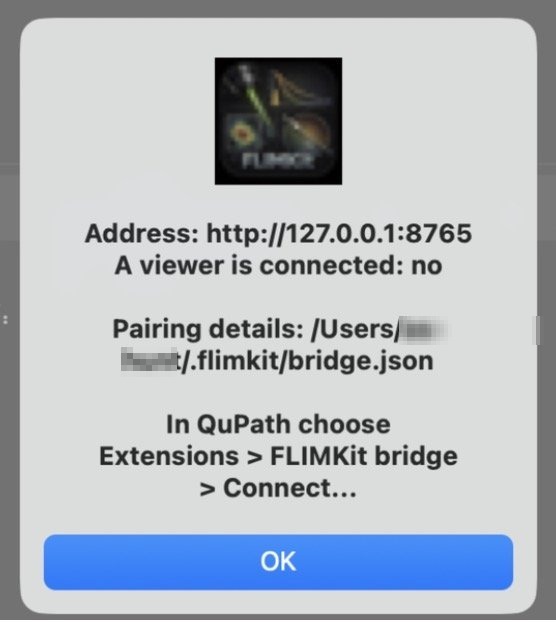
Pairing is automatic. The server writes its address and a freshly generated token to ~/.flimkit/bridge.json, and QuPath and Fiji read that file when you choose Connect, so there is nothing to type in. Each start mints a new token, and the clients re-read the file before every call, so restarting FLIMKit does not break a connection.
It also writes ~/.flimkit/qupath-bridge.json with the same address, for QuPath extensions built before the server moved out. That second file goes once those versions are retired.
If port 8765 is taken, the bridge picks a free one and records it in the same file. To pin a different port, set it in ~/.flimkit/config.json:
{
  "plugin:flimkit_bridge": {"port": 8770}
}
The ROI panel gains a Send to a viewer button. It checks that a viewer has connected and that there is something fitted to send, then tells you which images are being served and what to choose in QuPath to fetch them.
Without the FLIMKit window
flimkit-bridge runs the same server with no window and no display, which is what you want on a headless machine or when QuPath or Fiji is the only front end:
flimkit-bridge                 # 127.0.0.1:8765, or a free port if that is taken
flimkit-bridge --port 9000
flimkit-bridge --no-announce   # serve alongside another bridge, print the token instead
flimkit-bridge --force         # take over from a bridge that was left running
It serves everything except the routes that read the open desktop session, since there is none. Opening files, fitting regions, the phasor, stitching and z-stacks work the same either way. Note that flimkit is the desktop app and always opens a window; flimkit-bridge is the headless one.
It refuses to start while another bridge is serving, because both would write the same pairing file and a client would pair with whichever wrote last.
What it serves
| Route | Purpose |
|---|---|
GET /v1/status |
Protocol, bridge and FLIMKit versions. The only route that needs no token |
/v1/datasets, /v1/datasets/{id}/... |
Open a file, list what is open, fetch planes and per-region statistics |
/v1/images/... |
The current intensity (photons) and lifetime (ns) images as float32 TIFF |
/v1/rois |
The Regions table as GeoJSON, in and out |
/v1/fit/defaults, /v1/jobs/{id} |
Fit settings, and progress or cancellation of a running fit |
/v1/phasor/settings |
What the phasor window can set: filters, including plugin ones, and IRF calibration |
/v1/pipeline |
Stitch and fit a tiled .lif, .xlif or .xlef |
/v1/zstack, /v1/zstack/scan, /v1/zstack/export |
Fit a folder of region_zN.ptu slices as one FOV, and rewrite a finished run as OME-Zarr or OME-TIFF |
A client checks protocol_version in the status reply to decide whether the two can talk. bridge_version is for display: the server and each client are versioned independently, so a difference there is normal.
Bridge security
The server listens on 127.0.0.1 only, and refuses any request whose Host header is not localhost, which stops a web page reaching it by resolving its own hostname to your machine. Every route except the status check needs the token.
Both programs therefore have to be on the same machine. If they are not, forward the port over SSH rather than exposing it:
ssh -L 8765:127.0.0.1:8765 you@the-flimkit-machine
Over a forwarded port, paths the bridge returns mean nothing locally. For z-stacks, GET /v1/zstack/volume.ome.tif streams the finished volume instead, and QuPath falls back to it on its own.