 FLIMKit
Plugins / FLIMKit / Writing Your Own Plugin · edit on GitHub
Writing Your Own Plugin
A plugin is a Python module that decorates functions with the hooks in flimkit.plugins. FLIMKit's own tools are registered the same way (flimkit/plugins/builtin/), so the file a contributor writes is the file a third party writes.
A first plugin
This is examples/plugins/hello_tool.py, a Tools menu entry that opens a message box:
from flimkit.plugins import tool

FLIMKIT_PLUGIN_API = 1


@tool(id='hello_example', label='Hello Plugin...', menu='Tools', order=900)
def open_hello(app):
    from tkinter import messagebox
    messagebox.showinfo('Hello', 'This window came from an add-on, not from FLIMKit.')
To try it:
- Copy it into
~/.flimkit/plugins/. Create the folder if it is not there; FLIMKit never creates it. - Tick
Load from ~/.flimkit/pluginsinFile > Preferences... > Plugins(Plugin preferences). - Restart FLIMKit.
Tools > Hello Plugin...is at the bottom of the menu, andHelp > Plugins...listshello_tool.py (1 registration(s)).
What each part does:
FLIMKIT_PLUGIN_APIdeclares the plugin API the file was written against, currently 1. A plugin declaring another version is refused rather than half-loaded. Leaving it out means "whatever this FLIMKit provides", so declare it.idhas to be unique across everything loaded, and the first registration of an id wins.menuis a slash path, so'Tools/Batch Processing'nests one level down, and any depth works.ordersorts entries within a menu, low first, ties broken by label. FLIMKit's own entries use 10 to 130 and the add-ons above use 500 to 900.- The function receives the GUI object.
app.rootis the Tk window to parent your own windows to. - Keep the tkinter import inside the function, so the module still imports on a headless machine where the bridge or the tests load it.
A fuller example
examples/plugins/demo_plugin.py uses most of the hooks at once: two Tools entries, a nested submenu, a file format, a sniffer, a phasor filter and its own settings. Copy it next to hello_tool.py and restart.
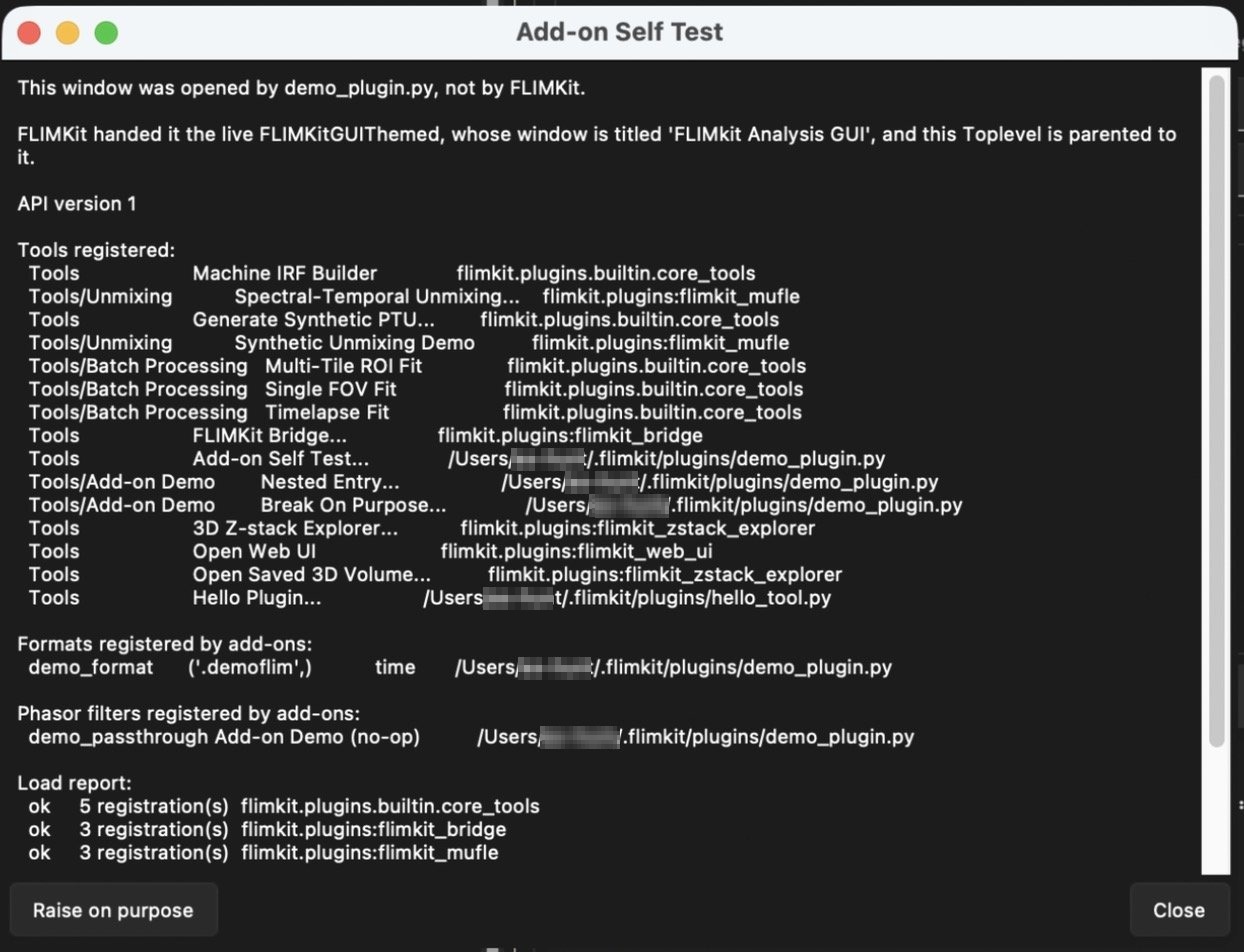
Tools > Add-on Self Test... opens a window listing everything registered, by whom, and the load report:
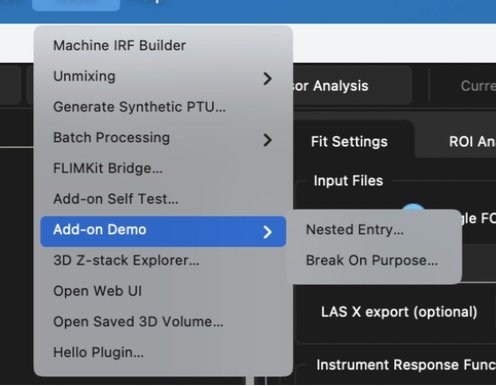
menu='Tools/Add-on Demo' is enough for FLIMKit to build the submenu:
and its @phasor_filter shows up in the Phasor Analysis filter list, after the three built-in filters:
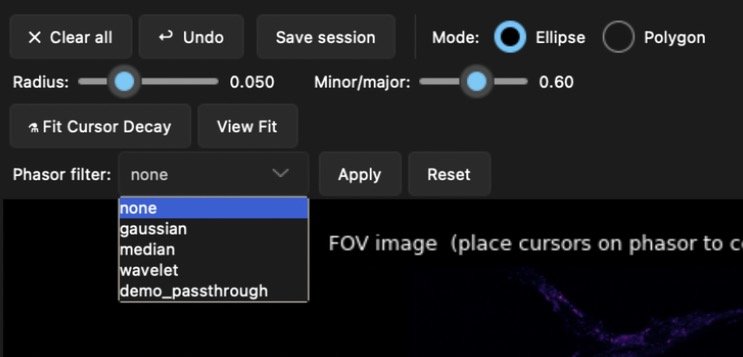
The same filter is offered in QuPath's phasor settings (QuPath Bridge) and in the web UI's Phasor tab, since both ask FLIMKit for the list.
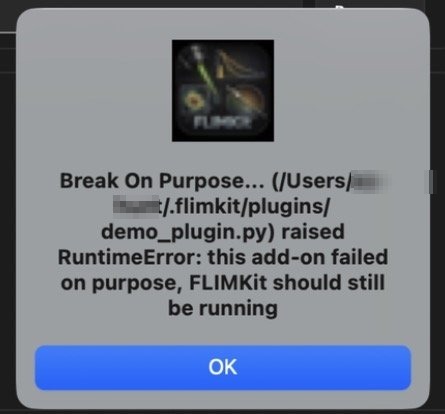
Break On Purpose... raises inside its callback, to show what a failing plugin looks like. FLIMKit keeps running and reports which plugin failed:
Current images and ROIs
Plugins can read the images and regions FLIMKit is showing without reaching into private GUI fields:
from flimkit.plugins import export_rois_geojson, get_current_images, import_rois_geojson, tool


@tool(id='bridge_example', label='Bridge Example...', menu='Tools', order=900)
def open_bridge(app):
    current = get_current_images(app)
    intensity = current['images'].get('intensity')
    lifetime = current['images'].get('lifetime')
    lifetime_unit = current['units'].get('lifetime')
    rois = export_rois_geojson(app)
    imported_ids = import_rois_geojson(app, rois, mode='append')
get_current_images(app) returns separate images and units dictionaries so metadata cannot collide with an image name. The image names are intensity and lifetime, in photons and ns. Arrays are 2D copies: intensity maps with trailing dimensions are summed down to 2D, and lifetime maps must already be 2D. An image that has not been calculated is left out of both dictionaries, and changing a returned array does not change FLIMKit's.
Raw per-pixel decay histograms are not included. They need a separate transfer and metadata contract for the bin width, repetition rate and IRF.
export_rois_geojson(app) returns a GeoJSON FeatureCollection. Coordinates are image pixels in [x, y] order from the top-left, and fractional coordinates are kept. ROI measurements are stored once under each feature's statistics property. Rectangles and ellipses carry their exact FLIMKit bounds in the properties, and ellipses are also drawn as a 64-point polygon for other programs.
import_rois_geojson(app, payload, mode='append') accepts a Feature or FeatureCollection and returns the new region ids. A plain polygon without FLIMKit properties becomes a polygon ROI, which is the normal path for data from Fiji. mode='replace' validates the whole payload before clearing the existing regions, and invalid geometry raises ValueError without importing anything.
These can be called from a background thread. FLIMKit moves the work to its GUI thread and blocks the caller until it finishes or raises.
File formats
A reader class registers with @file_format, and FLIMKit's own readers keep working as they did:
from flimkit.plugins import file_format


@file_format(id='mine', label='My Format', exts=('.mine',), modality='time')
class MyReader:
    def __init__(self, path, **kwargs):
        ...
modality is time, frequency or intensity, and it is what file_modality() reports. The extension then works everywhere a path is accepted, including FLIMFile(path) and the file dialogs. A built-in extension always wins, so registering .ptu does not take .ptu away from the PicoQuant reader.
For a format with no extension of its own, register a sniffer:
from flimkit.plugins import format_sniffer


@format_sniffer(tier='magic')
def sniff(path):
    with open(path, 'rb') as fh:
        if fh.read(7) == b'MYMAGIC':
            return 'mine'
    return None
tier='magic' runs after the built-in extension table and magic-byte checks, which is the safe place. tier='extension' runs before the extension table and can take a file away from a built-in reader, so use it only for a format that genuinely shares an extension with something else. A sniffer that raises is reported and skipped.
Phasor filters
from flimkit.plugins import phasor_filter


@phasor_filter(id='mine', label='My Filter')
def mine(real, imag, sigma=1.0):
    return real, imag
The filter is then usable anywhere gaussian, median and wavelet are: the Phasor Analysis filter list, saved phasor sessions, the bridge, and flimkit.phasor.filters.phasor_filter_methods(). Only the keyword arguments your function declares are passed to it, out of mean, sigma, size, wavelet, level and threshold_mode. If it declares sigma or size, the Phasor Analysis panel shows that box when your filter is selected. The three built-in methods cannot be overridden.
Fit backends
A plugin can take over the per-pixel fits with its own compiled code, for example a C or CUDA library loaded with ctypes. FLIMKit's MLX, CUDA, MPS and ROCm backends are the same kind of object, so a plugin backend gets exactly the arguments they do:
from flimkit.plugins import fit_backend


@fit_backend('my_c', 'My C kernels', priority=100)
def make_backend():
    lib = load_my_library()          # None when it is not built for this machine
    return None if lib is None else MyBackend(lib)
The factory runs the first time a fit needs a backend. It returns an object with any of batch_fixed_tau, batch_grid_scan_1exp, batch_free_tau_fit and batch_dist_scan_unimodal, which have the signatures in flimkit/GPU/_base.py, or None when the library or device is not there. Subclassing flimkit.GPU.PluginBackend gets you the built-in backends' helpers for the background estimate (_estimate_bg_batch) and for filling in the result maps (_init_maps, _scatter_fixed_tau, _scatter_1exp, _scatter_free_tau), and the methods you leave out hand their fits back. Accept **kwargs on each method, so arguments added later do not break your backend.
You do not have to cover every fit. A method that is missing, raises NotImplementedError or returns None hands that fit back to FLIMKit, which tries the built-in GPU backend your backend displaced and then the CPU. So a backend that only does free-τ fits, or only the simple case without a fit window, is fine.
How one is chosen:
- With
auto, the default, add-on backends are tried first, lowestpriorityfirst, and the first one whose factory returns an object is used. Installing one is a deliberate act, so it goes ahead of the built-ins. - For a free-τ fit, an add-on backend also goes ahead of FLIMKit's numba fit. If it declines, numba runs before any built-in GPU backend, as it would without the add-on.
- A factory that raises is reported in the Progress log and skipped.
FLIMKIT_FIT_BACKENDoverridesauto: an add-on id, a built-in (mlx,cuda,mps,rocm), orcpufor no backend at all. Use it to compare an add-on against the built-ins without uninstalling it, or to pin one for a published analysis.
Compiled code cannot be imported from a wheel dropped into ~/.flimkit/plugins/, since Python does not load .so, .dylib or .pyd files from a zip. Ship the plugin as a folder instead, with the shared library inside it next to __init__.py. FLIMKit loads a folder from disk, so ctypes.CDLL can open a path next to __file__, and this works in the compiled app as well.
Do not build the library with OpenMP. PyTorch carries its own OpenMP runtime, a second one in the same process aborts it with OMP: Error #15, and that is an abort rather than an exception, so neither your plugin nor FLIMKit can catch it. The order does not help: whichever runtime initialises second is the one that dies, and get_backend imports the built-in backends before it loads any add-on. KMP_DUPLICATE_LIB_OK=TRUE silences it, and the OpenMP documentation says it may crash or silently return wrong results, so it has no place in a fit. Thread the kernel with pthreads, or CreateThread on Windows. On the worked example that costs about 8 per cent against the OpenMP build and returns bit-identical amplitudes. flimkit-accelerator-plugin is a worked example: a C fixed-τ kernel, its ctypes wrapper, and a build.py that compiles it and copies the folder into place.
Running at startup
A plugin that needs to be doing something from the moment FLIMKit opens registers a startup callback:
from flimkit.plugins import startup


@startup('my_server', order=200)
def start(app):
    ...
It runs once, with the GUI object, after the window is built, lowest order first. A startup that raises is printed in the Progress log and the rest still run, so a broken plugin cannot stop FLIMKit opening.
Do not block here. It runs on the UI thread before the window is handed to the user, so anything long-lived belongs on a daemon thread that the callback starts and returns from.
Buttons in the ROI panel
from flimkit.plugins import panel_button


@panel_button('send_somewhere', 'Send to Somewhere', panel='roi', order=200)
def send(app):
    ...
panel accepts 'roi' only for now, and an unknown panel is refused at registration. Buttons appear under FLIMKit's own, three to a row, sorted by order then label, and the callback receives the same GUI object a @tool does. Ids have to be unique, the same as tools.
Settings a plugin owns
from flimkit.plugins import plugin_config

cfg = plugin_config('my_plugin')
cfg.set('threshold', 12)
cfg.save()
threshold = cfg.get('threshold', 10)
That writes to a plugin:my_plugin section of ~/.flimkit/config.json, which FLIMKit itself never reads. A plugin cannot reach the expert or preferences sections through this, so it cannot change how the fitters behave behind your back.
Figures in a plugin window
FLIMKit's dark theme sets matplotlib's text, label and tick colours to white for the whole process, and that includes your figures. A Figure() with the default white background then has invisible axes. Give the figure and axes a dark facecolor, as FLIMKit's own panels do:
fig = Figure(figsize=(7, 4.5), dpi=100, facecolor='black')
ax = fig.add_subplot(111, facecolor='black')
Shipping a plugin as a package
A plugin with dependencies of its own, or one other people will install, declares an entry point in its pyproject.toml:
[project.entry-points.'flimkit.plugins']
my_plugin = 'my_plugin.register'
The module on the right is imported at startup, so put the decorated functions there and keep its imports cheap. Installed packages load after the built-ins and before ~/.flimkit/plugins, and are not gated by the user-folder switch, since pip install is already a deliberate act. They do respect the master switch and the disable list, under the entry point name.
The frozen macOS and Windows builds cannot see entry points, since there is no site-packages. For them, publish a pure-Python wheel that people drop into ~/.flimkit/plugins/ (Installing add-ons); FLIMKit puts it on the import path and reads its entry point as if it had been pip installed.
FLIMKIT_PLUGIN_PATH takes a colon-separated list of extra folders, scanned after ~/.flimkit/plugins. It is meant for development and is not covered by the user-folder switch.
Compatibility
FLIMKIT_PLUGIN_API is 1 and the hooks above are frozen at that version. New hooks get added; the ones here keep their arguments and their meaning. flimkit_tests/tests/fixtures/plugin_api_v1/ holds a plugin written against v1 that the test suite loads on every run, so a change that would break an installed plugin fails the build rather than reaching a release.