 FLIMKit
Plugins / FLIMKit / Plugin Troubleshooting · edit on GitHub
Plugin Troubleshooting
Start with Help > Plugins... (Checking what loaded) and the Progress log. Between them they say whether a plugin was found, whether it imported, and whether its startup ran.
It is not in the list at all
- Installed into another environment. The package has to be in the Python FLIMKit runs from. Check from the same terminal you launch FLIMKit from, for example
python -c "import flimkit_web_ui; print('ok')". With conda or uv, activate the FLIMKit environment first. - User plugins are off. A file in
~/.flimkit/plugins/is ignored untilLoad from ~/.flimkit/pluginsis ticked in Preferences, and the change takes effect on the next start. - Its name starts with
_or.. Those files are skipped. - It is disabled. A plugin unticked in
Help > Plugins...is listed inplugins.disabledin~/.flimkit/config.json. - Plugins are off entirely.
--no-plugins,FLIMKIT_NO_PLUGINS=1or an untickedLoad plugins at startupload nothing, not even FLIMKit's own Tools entries. - The compiled app. It cannot see pip-installed packages. Drop the add-on's pure-Python wheel into
~/.flimkit/plugins/instead; a platform-specific wheel is refused with that reason.
It is listed as failed
The line in Help > Plugins... gives the exception. The usual ones:
| Message | Cause |
|---|---|
ModuleNotFoundError |
A dependency is missing from FLIMKit's environment, or from the compiled app, which cannot fetch it |
declares FLIMKIT_PLUGIN_API ... |
The plugin was written for another plugin API. Update the plugin, or FLIMKit |
... already registered by ... |
Two plugins use the same id. The first one loaded keeps it, and the error names it |
unknown panel |
A @panel_button asked for a panel other than 'roi' |
A failed plugin has its registrations rolled back, and the others still load.
It loaded, but its startup failed
Startup callbacks run after loading, so a failure there does not show in Help > Plugins.... Look in the Progress log for a line like
[Plugin] startup web_ui (flimkit.plugins:flimkit_web_ui) raised OSError: [Errno 48] Address already in use
That one is a port clash: web UI 0.1.0 used 8765, the bridge's port. Update the web UI, which now defaults to 8766 and moves to a free port if that is taken, or give it a port in ~/.flimkit/config.json (Port and password). A clash on a port you set yourself is still reported this way, on purpose.
It fails when you use it
A plugin that raises in a menu entry or a button gets a message box naming the plugin and the error, and FLIMKit carries on (A fuller example). An error from a window the plugin opened itself goes to the error log. Help > View Error Logs shows the current session with the full traceback, including the file and line in the plugin:
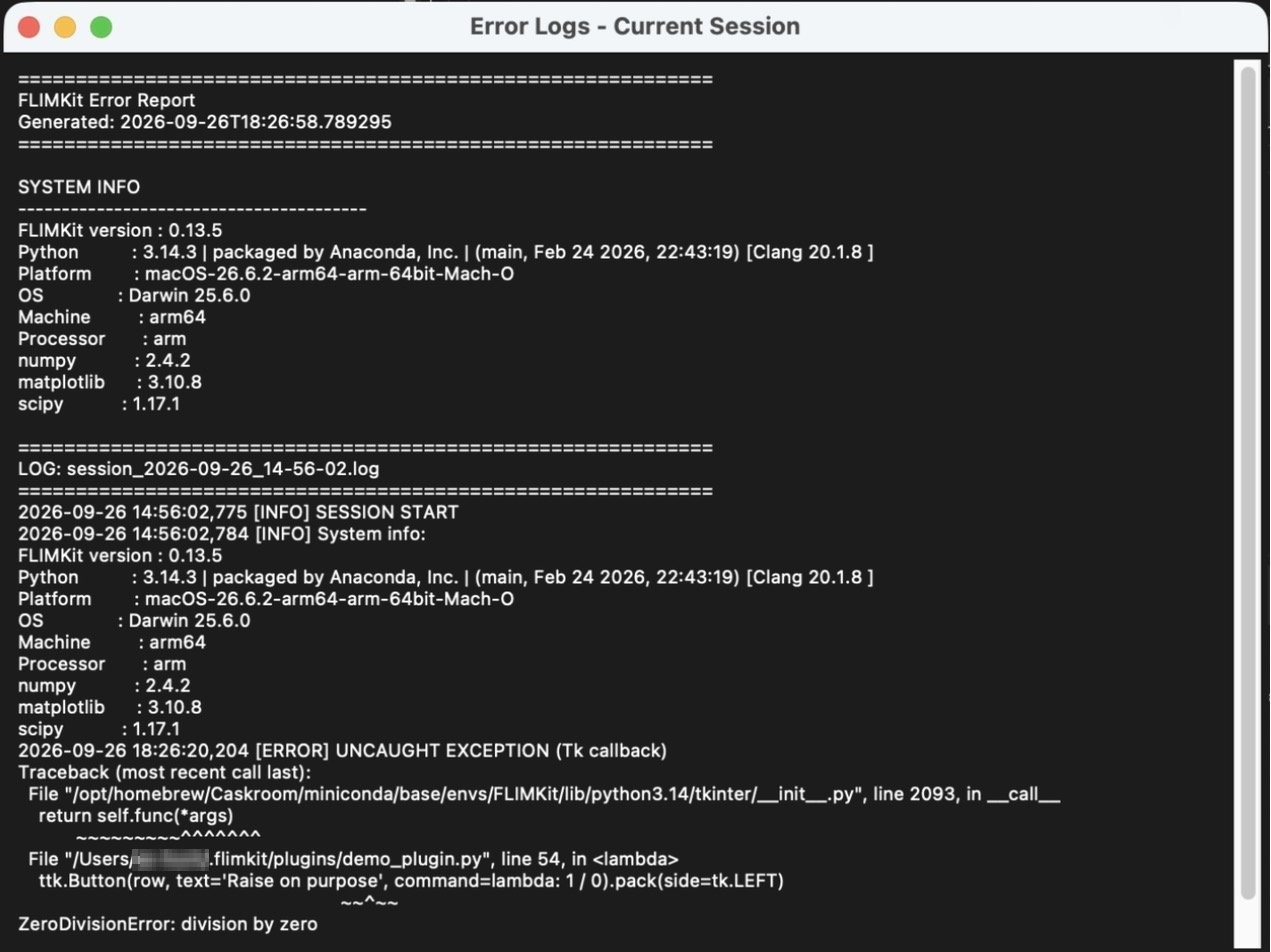
Help > Export Error Logs saves the same report to send with a bug report.
The bridge
- QuPath or Fiji says FLIMKit is not running. The pairing file names a FLIMKit that has quit. Start FLIMKit or
flimkit-bridge, then Connect again. flimkit-bridgerefuses to start. Another bridge is serving. Stop it, or pass--forceto take over, or--no-announceto run alongside it.- Every request fails with 401. The token changed because FLIMKit restarted. Current clients re-read
~/.flimkit/bridge.jsonbefore every call; an old QuPath jar may not, so Connect again or update it. - QuPath and FLIMKit on different machines. The bridge only listens on
127.0.0.1. Forward the port withssh -L(Bridge security). - Fiji does not show
Plugins > FLIMKit. Fiji is older than 2.16 or is running a JDK older than 21 (Installing the Fiji plugin).
Other add-ons
- Z-stack explorer says to load a z-stack first. It only works with Analysis set to Z-stack and a stack loaded. The lifetime pane is empty until the stack has been fitted.
- Z-stack explorer saves but no viewer opens. PyVista is missing; install the
[gui]extra. - Web UI page does not load. Check the Progress log for the startup line and the port it is using, and whether a password is set.
- A plugin's figure has no axis labels. It is drawn on a white background while FLIMKit's theme makes text white (Figures in a plugin window).
Reporting a problem
Include the Help > Plugins... list, the Progress log from startup, and the exported error log. Start once with python main.py --no-plugins too: if the problem goes away, it is in a plugin rather than in FLIMKit.