 FLIMKit
Plugins / FLIMKit / Z stack Explorer · edit on GitHub
Z-stack Explorer
flimkit-zstack-explorer takes a z-stack loaded in FLIMKit, stacks its per-slice intensity and lifetime maps into two volumes, saves them as one OME-Zarr store, and opens a 3D viewer with the two side by side.
Installing the explorer
pip install 'flimkit-zstack-explorer[gui]'
Quote it: in zsh, the macOS default shell, an unquoted [gui] is a glob and the command fails with "no matches found". [gui] adds PyVista, which draws the 3D view. Without it the volume is still built and saved, and the viewer step tells you what is missing. Check the install from the terminal you start FLIMKit from:
python -c "import flimkit_zstack_explorer, pyvista; print('ok')"
Using the explorer
- Load a z-stack in Single FOV Fit with Analysis set to Z-stack, and fit it, or pick a Z row in a project folder that already has a fit (Step 14).
Tools > 3D Z-stack Explorer...asks where to save the store (zstack_volume.zarrby default) and opens the viewer when it is written. A store already at that path is overwritten.
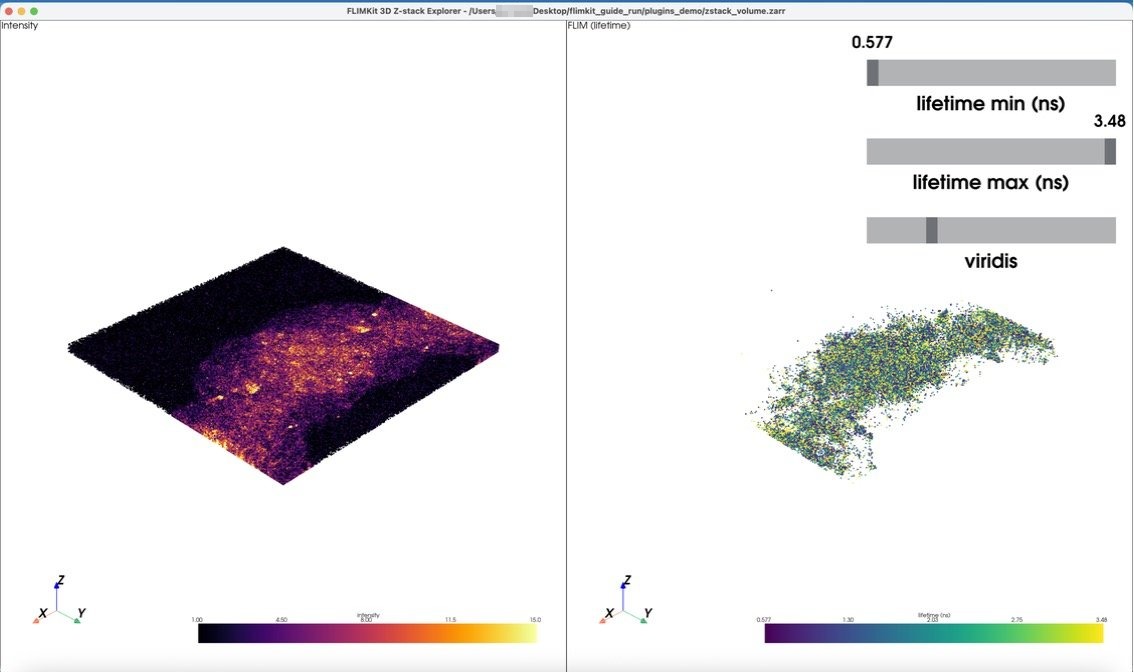
This is the Series008 stack, 8 slices. Intensity is on the left and lifetime on the right, and the two cameras are linked, so dragging either rotates both. Scrolling zooms.
- Each voxel with data is one point. A voxel with no photons or no per-pixel fit has no point at all, which is why the lifetime pane only shows the fitted cells. This is deliberately not volume rendering: a volume renderer resamples onto a dense grid and fills isolated gaps from their neighbours, which would draw lifetimes where nothing was fitted.
- Intensity is clipped at its 99th percentile, the same clip the 2D view uses, so a few hot pixels do not wash out the scale.
- lifetime min (ns) and lifetime max (ns) set the colour range, starting at the 2nd and 98th percentiles like the Auto button in the 2D view. The third slider picks the colormap from the same set as the 2D FLIM view.
The volumes are built from the preview panel's own display code, the same path the z-slider uses, so each slice matches what the 2D view shows for it.
Tools > Open Saved 3D Volume... reopens a .zarr store from an earlier run without a z-stack loaded. Outside FLIMKit:
python -m flimkit_zstack_explorer.viewer --zarr zstack_volume.zarr
The store has two channels, intensity and lifetime in ns (NaN where a slice had no per-pixel fit), so it also opens in anything else that reads OME-Zarr.
The viewer runs as its own process. FLIMKit's window is Tk and PyVista's is VTK, and on macOS both expect to own the main thread, so they are kept apart.